

Why Deleting Data is Harder than Writing It
Deletion, backpressure, and the cost of forgetting

Even if you don’t use Snapchat, as a programmer, you must have seen this meme.

And as a beginner in Software Engineering, I also laughed at this, not realizing what it takes to make something ephemeral at a global scale.
Deletion looks like the simplest operation in systems. You set a TTL, time passes, and the data disappears.
Except that’s not what happens.
At scale, deletion is one of the most expensive things a system can do. It causes writes instead of removing them, creates background work instead of finishing it, and forces systems to delay forgetting long after data has stopped being useful.
This isn’t a bug. It’s how systems survive.
In this piece, we are going to see what it takes to “delete” things, from operating systems to TTL stores to storage engines, and why most systems quietly turn deletion into a negotiated, rate-limited process instead of a moment in time.
What does it mean when we say “expired”?
When we say expired, we don’t mean “deleted”; we mean that the user doesn’t see the keys being returned.
And there’s a distinction between them.
Deleted means that the key doesn’t exist in memory.
A user can be prevented from seeing the keys, even if they’re not deleted from memory.
Let’s understand why deleting and hiding are separate things, the former being resource-heavy.
Why is deletion resource-heavy?
To truly understand why we can’t “just delete” the file, we need to understand how deletion happens in modern OS and disk. I wanted to include this as it makes us realize that deletion is a much more complex operation than we realize. Even the OS handles deletion as a metadata update.
But before understanding what is involved in deletion, let’s understand a few terms needed to understand it.
Inodes
When we have a file with its name and content, they’re just readable for humans; it’s not how the OS tracks the files. OS tracks it by a structure called Inodes - they can be considered as a passport for the file.
It contains things like - file_type1, permissions2, file_size, link_count3, data block counters4, etc.
Note that it doesn’t have the content for the file.
Directory Entry (dentry)
Its an in-memory data structure used to map files to their corresponding inodes.
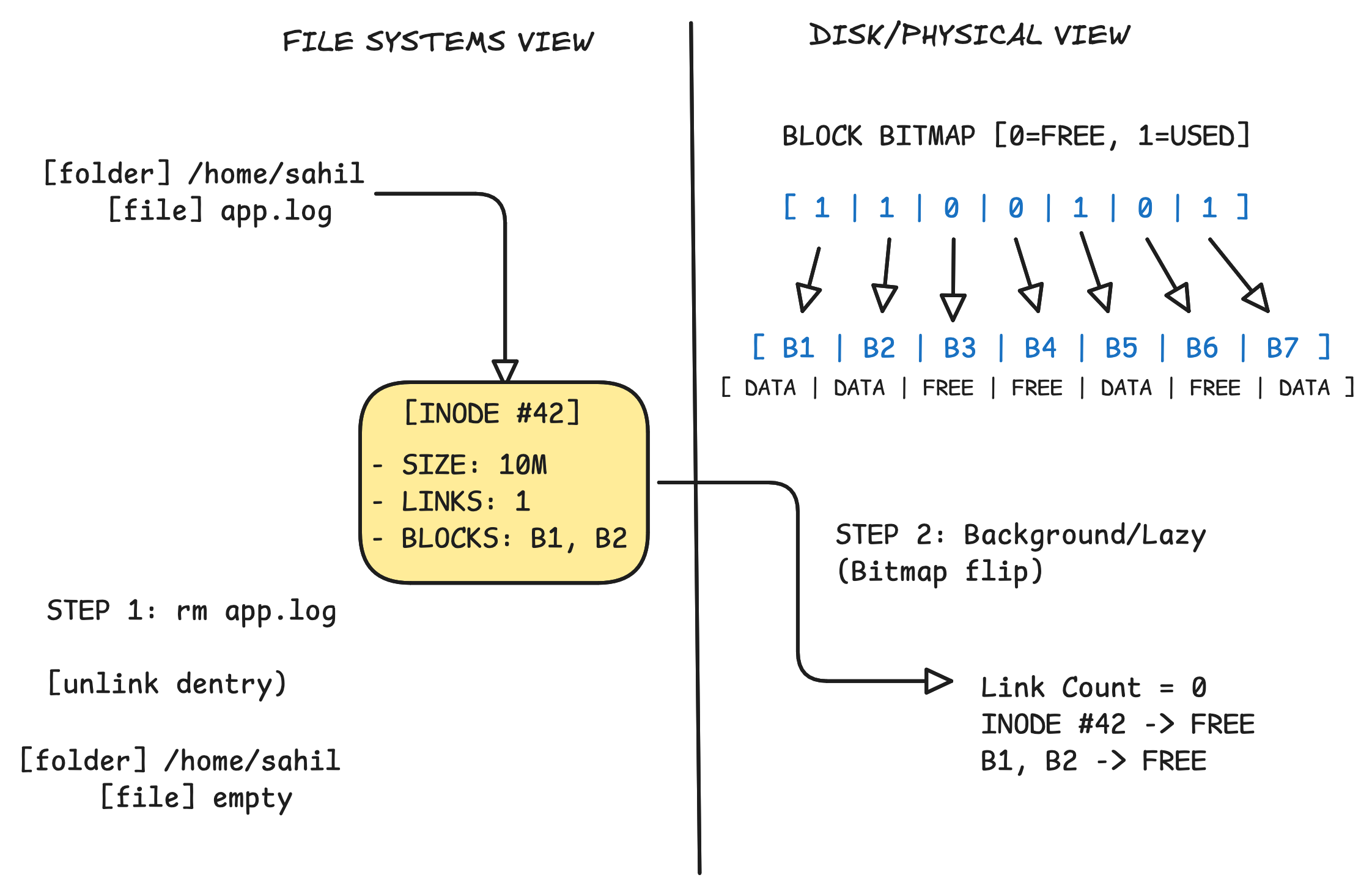
Let’s say you deleted a file with the rm app.log command. We will see the step-by-step process that happens.
Namespace detachment
When rm is triggered (internally, it uses unlink()), the OS goes to the directory entry, and
the OS finds the entry in the directory file that maps the filename to an Inode number. It removes this mapping.
Every Inode has a “link_count.” If we have hard links5, the count might be >1. The OS decrements this count. If the count hits zero and no processes have an open file descriptor to that Inode, the OS triggers the actual cleanup
But it’s just the first step. The directory knows that this file is deleted, but the OS still needs to claim the freed-up resources.
Metadata update
Here, it updates 2 structures -
Inode Bitmap: The bit representing that specific Inode is flipped from 1 (allocated) to 0 (free)
Data Block Bitmap: The Inode contains pointers to specific blocks on the disk where the actual data resides. The OS looks up these addresses and flips their corresponding bits in the Block Bitmap6 to 0
“At this exact moment, the data is still physically on the disk. This is why forensic tools can recover “deleted” files; the pointers are gone, but the raw bytes in the data blocks remain until they are overwritten by a future write operation.”
Now comes the actual “delete” part. The physical layer makes sure that it knows that this memory block has been deleted and can be used for writing any other data.
The Physical Reality
SSDs and HDDs differ here in process, but the underlying mechanism remains the same.
The OS needs to know (or tell the SSDs/HDDs) that these Logical Block Addresses7 (LBAs) are stale now, and the data needs to be wiped to make it ready for new writes.
But that’s not all, there are a lot more issues when it comes to deleting things at scale.
Deletion nuances
The Metadata Contention Problem
A write usually appends or modifies a known location. A deletion requires the OS to traverse the metadata tree (B-Tree or Inode table) and update global structures like the Free Block Bitmap8.
In high-concurrency environments, deleting thousands of small files can lead to “metadata thrashing.” The filesystem must lock the parent directory and the global allocation bitmaps.
In systems like Kafka or LSM-trees, we can’t just “delete” a middle chunk of a file without rewriting the whole thing. So, we have to wait for Compaction or Segment Merging, which is an incredibly I/O-intensive background process.
SSD Write Amplification
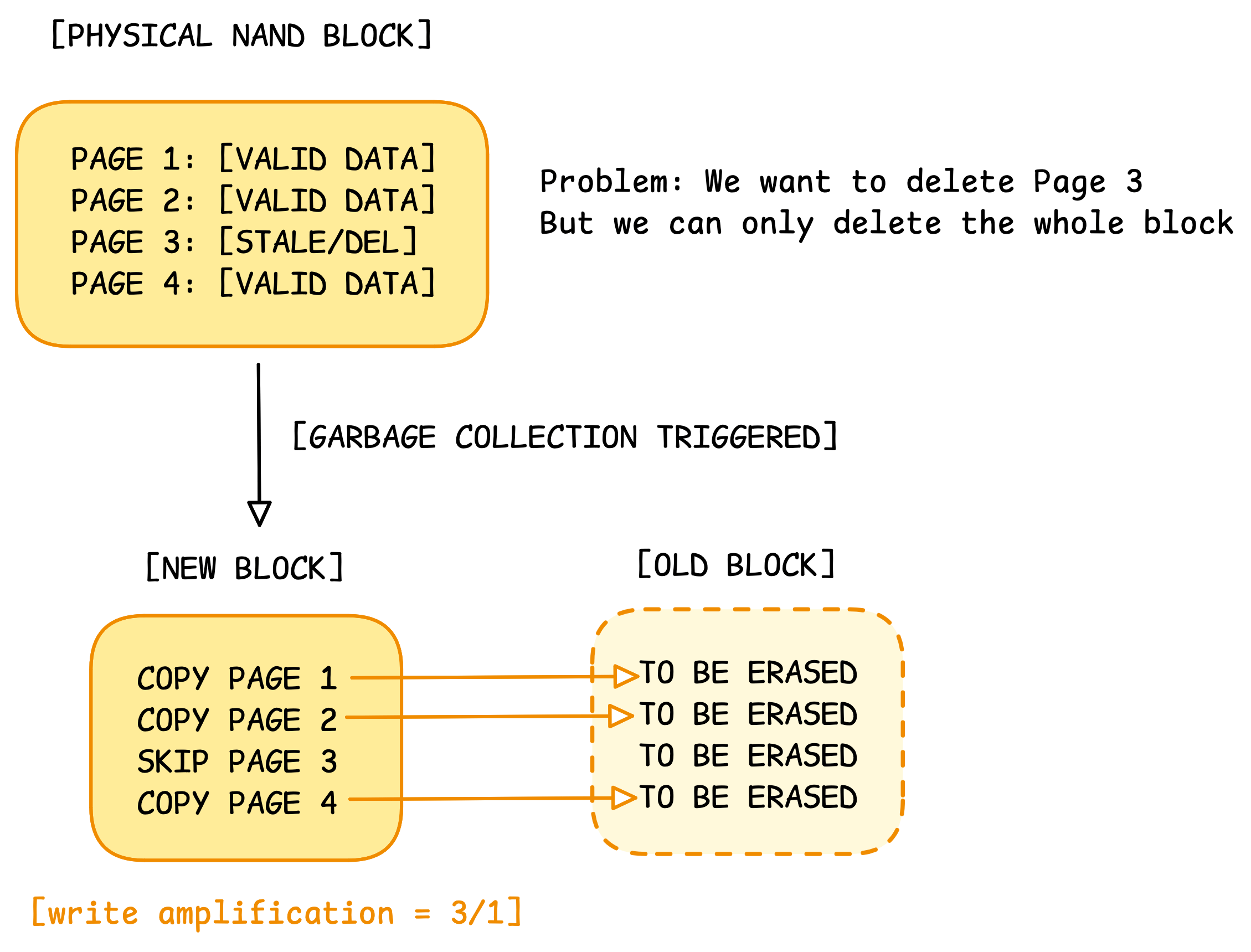
This is the hidden “tax” of deletions. Because SSDs can only erase in large “blocks” (blocks of 128 to 256 pages) but write in small “pages” (4KB–16KB), deleting data creates holes.
A single user-level delete can trigger multiple internal physical reads and writes. This is Write Amplification9. It wears out the flash cells and introduces latency spikes (the “GC pause”).
Fragmentations
Frequent deletions create “Swiss cheese” on the disk.
When the OS tries to write a large contiguous file, it can’t find a single contiguous block. It has to scatter the file across the “holes” left by deleted keys.
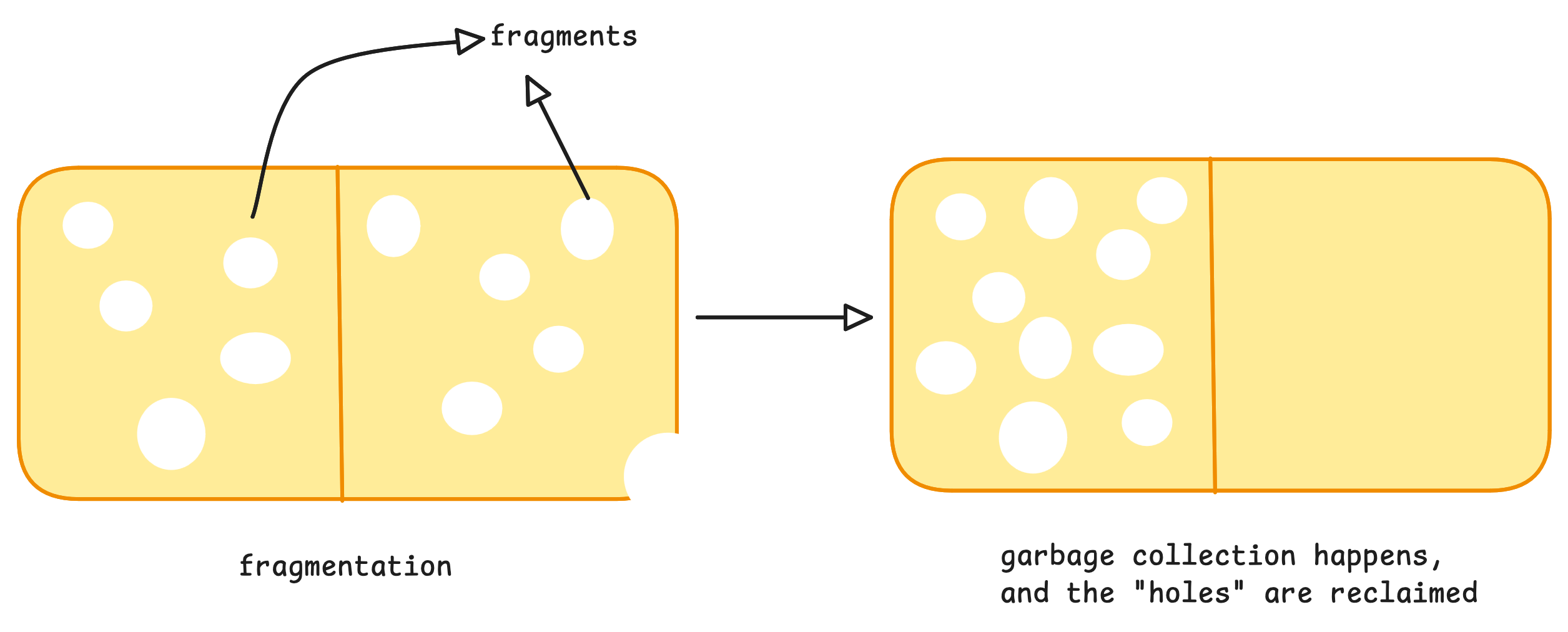
This increases the complexity of the Scatter-Gather I/O10 operations the kernel has to manage.
Building a TTL-based store — Naive Design
Let’s think about designing a TTL-based key-value store with low read latency, predictable CPU and memory bounds.
#1 Just expire on read
We can store something like – key: value, ttl
And we check if the key has expired on read. If it has expired, can we just delete it? Something like —
if key.ExpiredTime() > time.Now() {
   store.DeleteKey(key) <----- enforces deletion from memory/disk
   return ""
} else {
   return key.value
}
We have tackled the problem of not showing the user the expired keys, but with millions of expired keys existing, they would consume storage, slowing disk I/O, which means we need to handle the deletion.
If we delete the keys on read, we face much higher read latency because deletion is more complex, as we saw above.
#2 Periodic cleanups
Instead of directly deleting it on read, let’s just store the expired keys in a bucket, and handle the deletion later, async.
In intervals, there is a cron job that takes the current bucket and deletes it from memory.
This sounds like it might work until we face issues -
What if there are millions of keys in each bucket? How would you store them in the bucket, and how would you delete them at the same time while keeping the workers stable? We are at risk of cron jobs themselves becoming an outage, which means there will be millions of expired keys taking up our storage/CPU processing.
The cron job might take several hours to process all the keys in the current bucket, which then means we might face a collision, 2 cronjobs trying to modify the same bucket at once. If Bucket A takes 2 hours to clear, but the cron job runs every 1 hour, we now have two workers fighting over the same resources.
This means we might need multiple buckets.
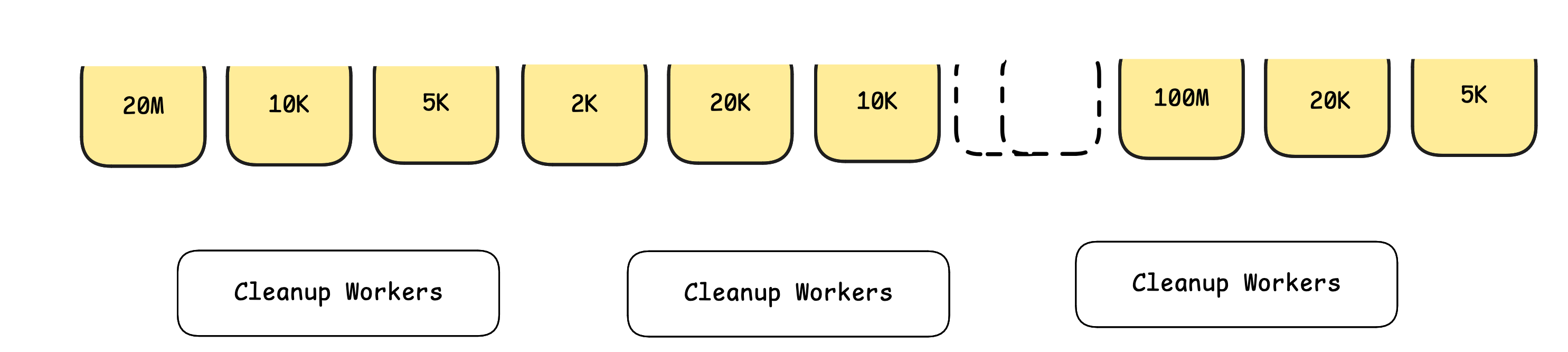
Specifically, a time series bucket that takes all the keys during an internal that are expired, and puts them accordingly. Now the cron jobs might tackle multiple buckets at once. There will be fewer keys per bucket, which is better than before.
We might also face the issue of uneven distribution.
Bucket_1 (now - 2 hours) -> 20M keys
Bucket_2 (now - 1 hour) -> 20K keys
Bucket_3 (now - 3 hours) -> 100M keys
Since the same cron job will take all these buckets, there will be uneven distribution of work, and inconsistent, unpredictable behaviour for our cleanup workers is always dangerous.
The real problem
I think we now realize the real problem we face in deletion – it’s not just the act of deletion, it’s the act of deletion at scale.
When millions of keys expire at the same time, we get -
CPU spikes
allocator pressure
lock contention
IO storms
Till now, from our naive designs, we established the following -
We can only hide the data on read, can’t delete it. This means deletion is handled async; it’s an eventually consistent deletion model
We need a way to put the expired key somewhere, in buckets, so that cron jobs can handle bulk deletion separately from reads
We can divide the expired keys into buckets based on the time interval of deletion and still create an uneven distribution of buckets, which results in unpredictable behaviour of the cleanup workers
So, naturally, the question now becomes - How about we make these buckets predictable?
Choosing constraints
Let’s answer the question we asked above.
Instead of putting keys in their exact bucket based on expiry (there can be uneven distribution of expired keys in time-separated buckets), we create just buckets, and put the expired keys in them as evenly as possible in those buckets, regardless of their expiry time.
At this point, we are differentiating between 2 entirely different things - buckets are not about grouping time-based keys; they become a way to divide work, regardless of the expiry aspect of it.
Meaning, we take a number, let’s say there are 1000 buckets, and we divide the expired keys into one-hour intervals into those 1000 buckets.
For the above example –
Total_expired_keys = 120.02M keys
Each bucket = 120.02/1000 ~= 0.12M keys ~= 120K keys
This is better than an uneven distribution. The cronjob behaviour is predictable.
But one thing that I’ve seen in software engineering (in my rather smaller experience) is that we shouldn’t try to guess about systems.
Even though the cronjobs are predictable, it might happen that a lot of bulk writes happen at the same time, with the same expiry.
Consider something like this - “Cache the current day’s progress for all the users at 3 AM, and expire them at around 12 AM midnight.”
I know, not the best system’s behaviour, but enough to see the issue. A lot of keys are going to expire at the same time, even if they’re bucketed differently.
This will again cause a huge CPU pressure while deleting at the same time.
If we look closely, this is a problem of backpressure while deleting.
Think about it, if
the rate at which the keys are expiring <= the rate at which keys are deleted,
only then will we get a stable rate at which things are getting deleted.
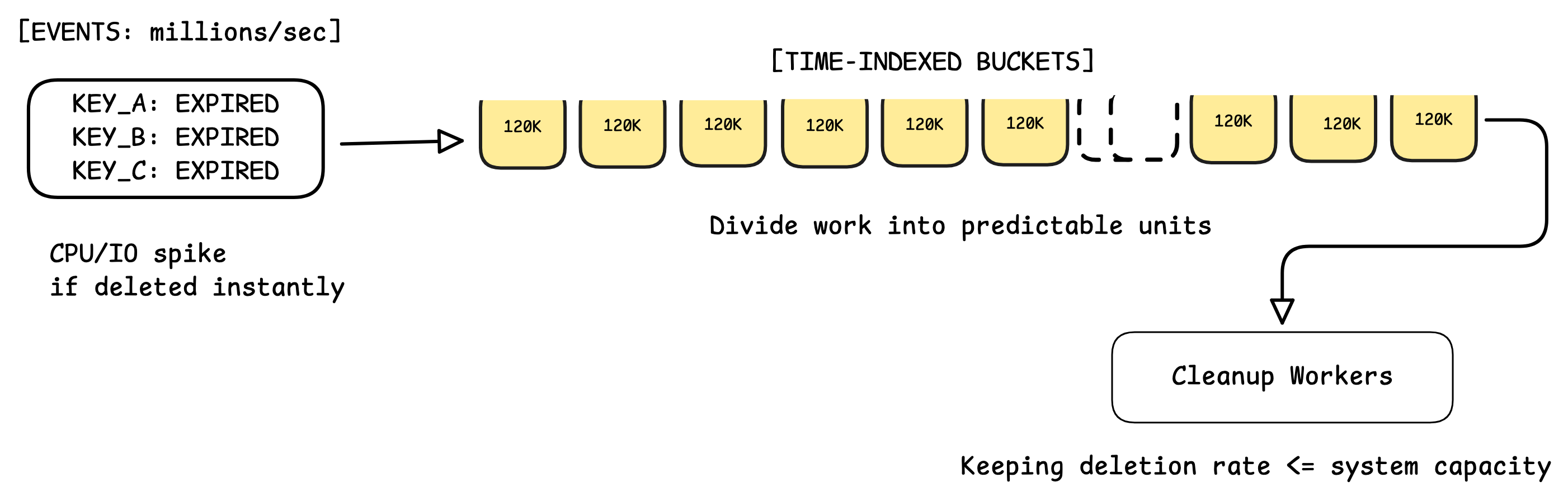
This means we need a configurable rate at which the cron jobs delete the keys.
At this point, we are not just implementing TTLs; we are building something like a “rate-controlled garbage collector for time-indexed data”.
Design Check: If we have thousands of buckets, the cleanup coordinator now has to track the state of every bucket (Is it "Pending", "Processing", or "Done"?). We’ve essentially built a distributed task queue just to handle deletes!
One thing that we should internalize from the discussion till now is that if millions of keys expire at the same second, we must violate time accuracy.
So the system must say:
“this key has expired” immediately
“this key is deleted” later
This means that -
expired ≠ deleted
deleted ≠ reclaimed
reclaimed ≠ compacted
Each step takes time. Each step consumes resources. Each step must be paced.
While researching alternative designs to perform deletion at scale, I found Hierarchical Timing Wheels to be one of the most popular ones (used by Kafka). I can’t cover it in this article, so I'm putting it in here just for reference.
Instead of scanning or sorting, time is divided into slots, and each clock tick directly says which keys expire next, making scheduling O(1). But this only optimizes when expired keys become visible, not how fast they can be deleted.
If millions of keys share the same expiry, they still surface together in a single slot, and the system must violate time accuracy, apply backpressure, or do async deletion to stay stable. Timing wheels remove scheduling overhead; they don’t eliminate the cost of forgetting.
Deletion feels similar across systems. We’ve seen this pattern repeat:
OS filesystems
TTL-based stores
background cleanup workers
Deletion is never instantaneous. Storage engines and distributed systems don’t escape this reality; they just do it differently.
Deletion in databases
By now, it should be clear that deletion isn’t a simple operation.
Databases don’t escape this; they just choose where and when to pay the cost.
Let’s look at two common storage designs.
B+ Trees
In a B+ tree–based database, data lives in-place.
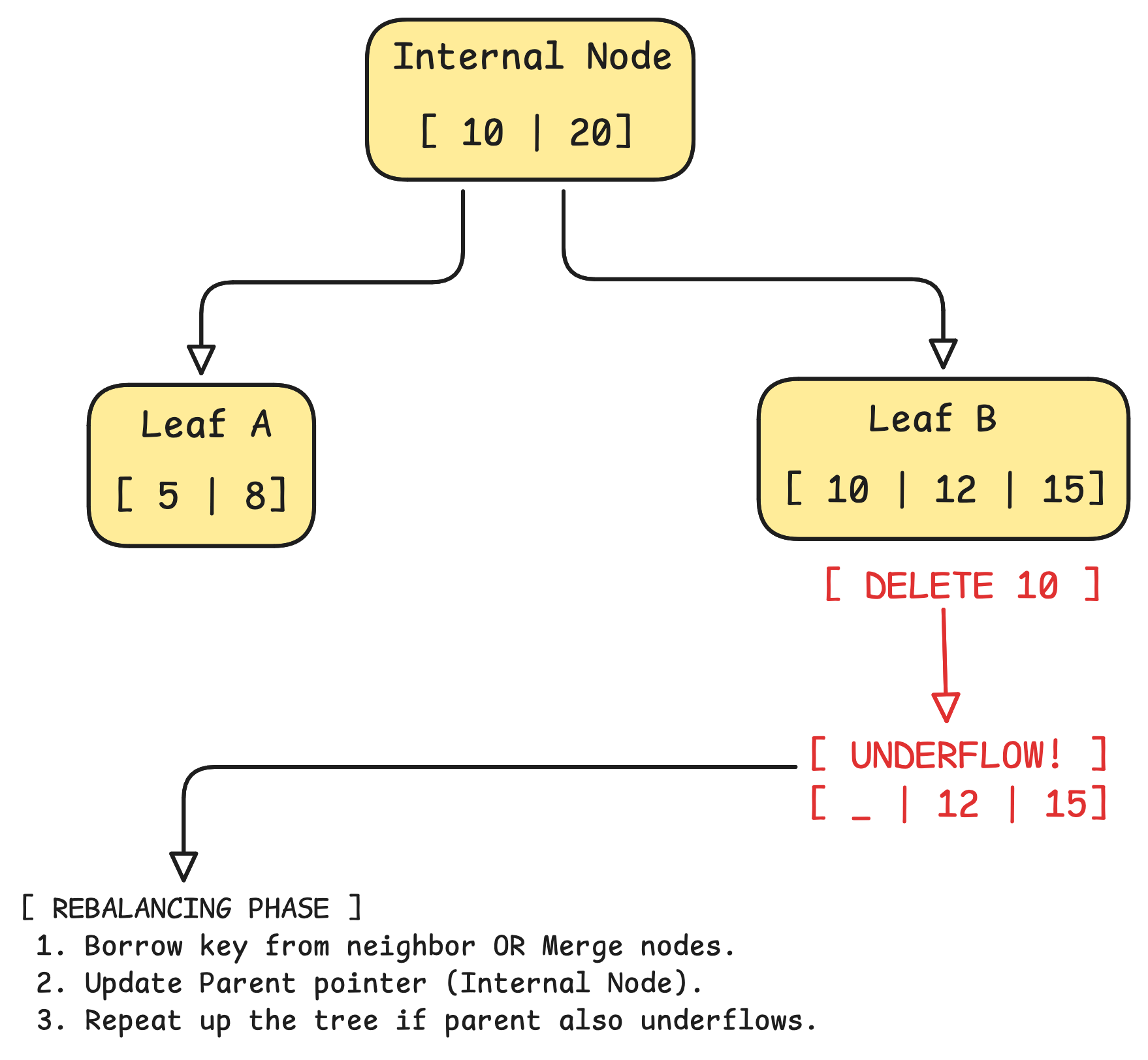
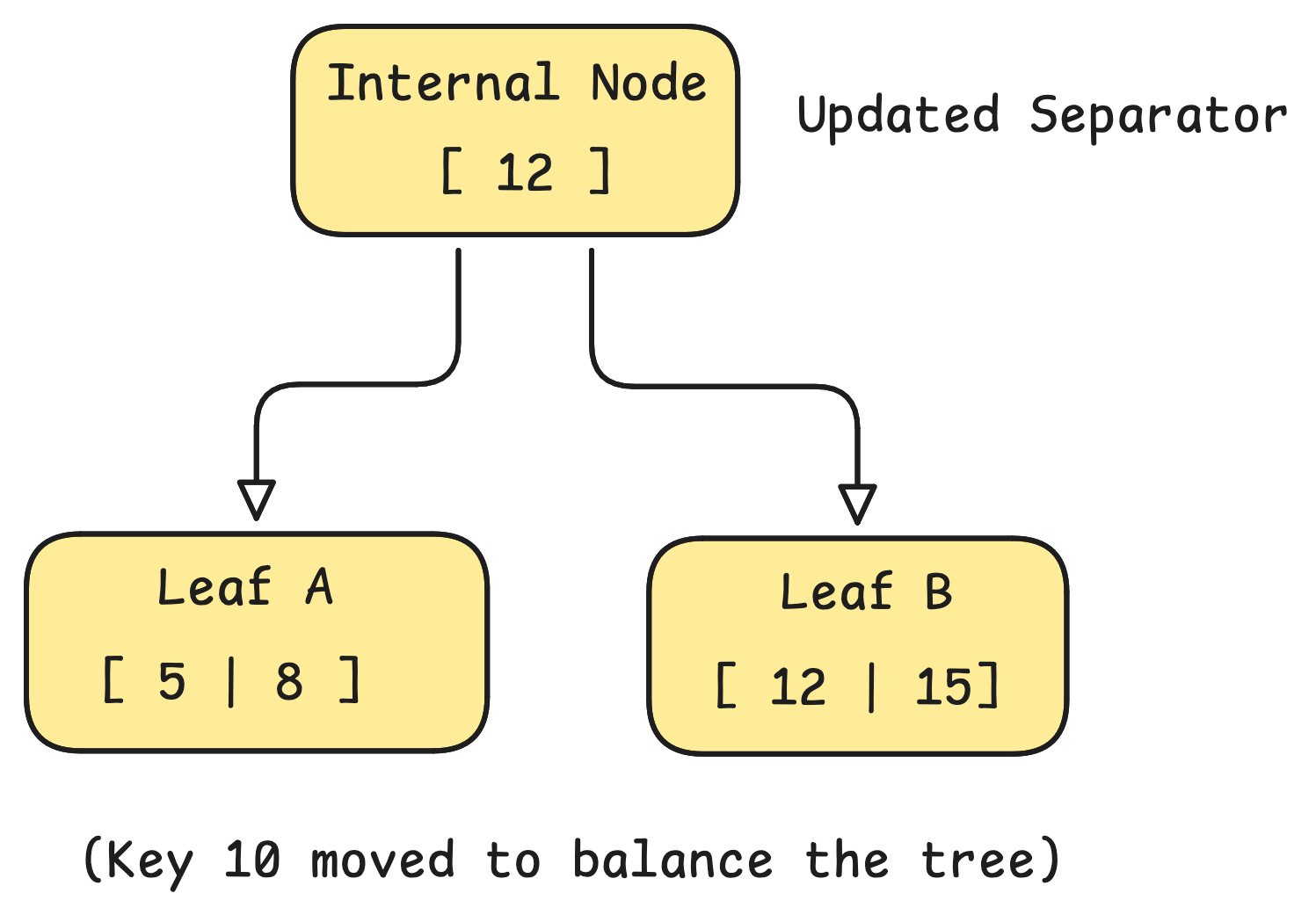
Deleting a key means: finding the leaf node, removing the entry, updating indexes, and sometimes rebalancing the tree.
This works well when deletes are rare, evenly distributed, and user-driven,
But when deletes are bulk, time-correlated, system-driven (TTLs, retention), each delete becomes:
a random write
a structural mutation
a place of lock contention
LSM Trees
LSM trees tackle this entirely differently; they treat “delete” as “just another write”.
A delete becomes just a sequential write, a tombstone, an append-only operation
Each delete operation is written to WAL and then to the SSTs.
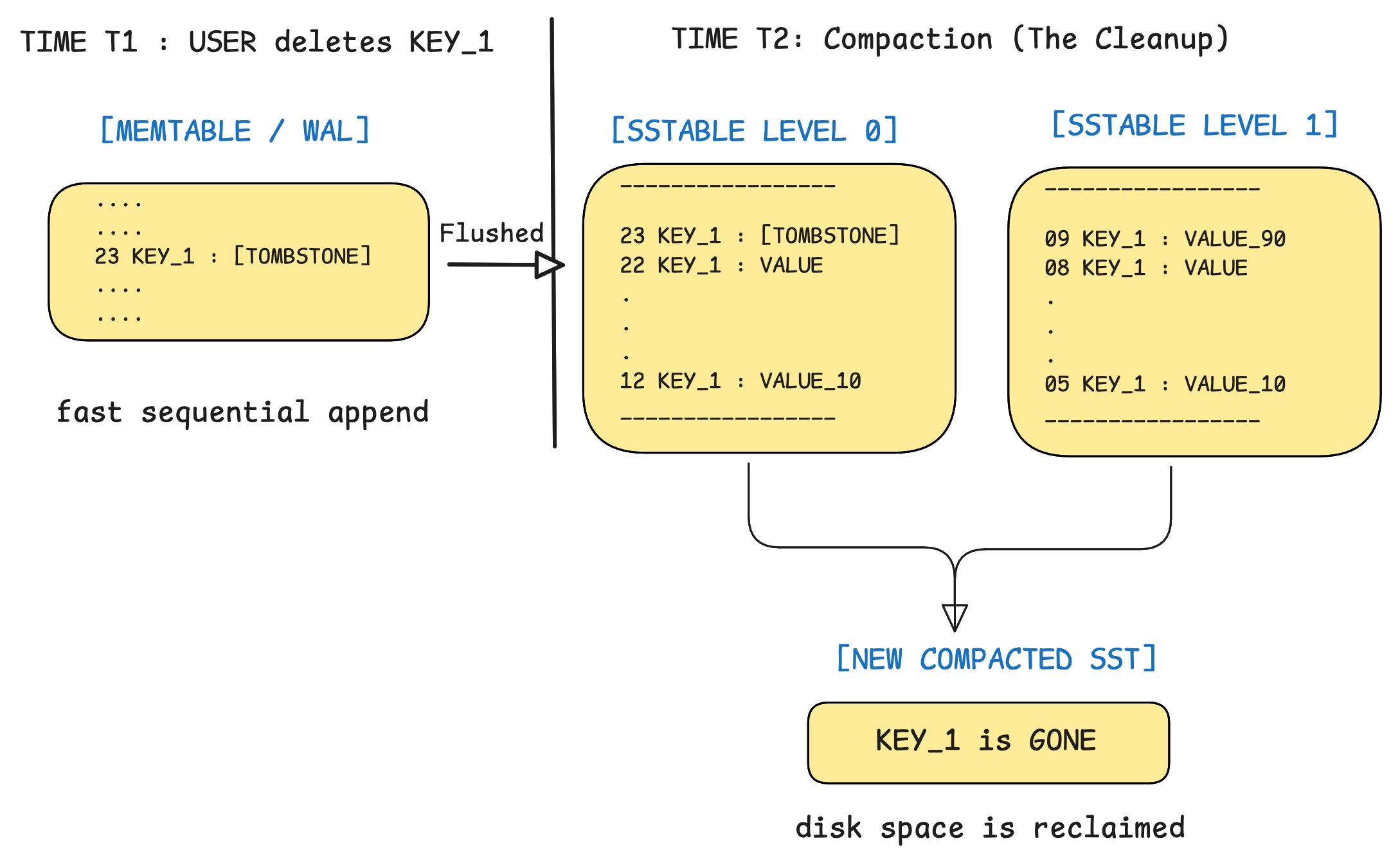
But if there are millions of deletes being done, the expired keys will take up space; they need to be deleted.
And that’s where LSM handles it differently; instead of doing any typical delete operation, they just compact the SSTs.
They go over the SSTs, take the latest values for each of the keys, compact them into another SST, and replace them. Even this is heavy when a lot of deletion happens together, as deletion is another write, it takes up memory.
Similarities?
Now, if we look closely, LSMs are trying to do the same thing we did earlier.
LSMs still pay the cost for deletion, but -
It’s later and amortized
during compaction
under controlled budgets
Which is kind of what we said we wanted in our design:
stable reads
bounded CPU
bounded memory growth
LSMs are basically rate-controlled garbage collectors disguised as databases (if we look at it for a delete workload).
During all these discussions, we were just talking about deletion in a single machine, and once deletion crosses machine boundaries, the cost of forgetting only goes up.
Distributed deletion is much more complex, with the same nuances, but with replication, coordination, ghost messages, and failure recovery.
Closing thoughts
Deletion looks trivial only because systems lie about it. We imagine data vanishing the moment a clock ticks, but in reality, it resists, stays, and leaves behind work.
What we call “delete” is really a sequence of transitions over time. Operating systems mark pointers, databases write tombstones, cleanup jobs pace themselves, and reclamation waits for safe moments.
Nothing disappears on command. It fades when the system can afford to forget it.
Once we see deletion as a process rather than an event, many design choices stop looking inefficient and start looking thoughtful.
A Message
If this saved you an hour of debugging, or gave you a clearer mental model of something you were half-understanding — that's what I'm here for.
If you want to support that work, you can here —
Is this a regular file, a directory, a symbolic link, or a socket?
Who can read, write, or execute?
How many filenames point to this specific Inode?
This is the "map." It contains addresses to the physical blocks on the disk where the content actually lives
Point to the file's data (inode). If the original file is deleted, the data is still accessible via the hard link.
A file system mechanism for free space management, where each bit represents a specific disk block to indicate its usage status
technique to specify the addresses of blocks of data on a storage device, such as a hard disk drive
Each disk block is represented by a single bit in a sequence (the bitmap), indicating whether it is free or currently in use
a phenomenon where the actual amount of physical data written to the memory exceeds the logical amount of data requested by the host system
The OS goes across all the fragmented data across the disk, gathers them together to create a contiguous free block of space
Damn! So often we treat deletion as something instant, when in practice it behaves more like deferred work that keeps piling up in the background. How do you handle situations where data actually needs to be gone within a strict time window, like for privacy laws, but the system naturally wants to delay deletion to stay stable?
I think b-tree also don’t delete the row immediately. They just mark it as tombstone. In vacuum process it’s cleaned and the space is reclaimed.
It because database use pages to store the data where doing delete immediately need moving the bytes on the pages. There different variants of the b-tree use different approach.
Nice read.